
Home inventory · iPhone, iPad and Mac
What you own, written down before you need it
Roomkeep turns your rooms and belongings into a document you can hand to an insurer: totals by room and category, item tables with photos, model and serial numbers, receipts attached at the back.

Roomkeep Pro: One purchase covers iPhone, iPad and Mac. Needs iOS 26, iPadOS 26 or macOS 26 or later.
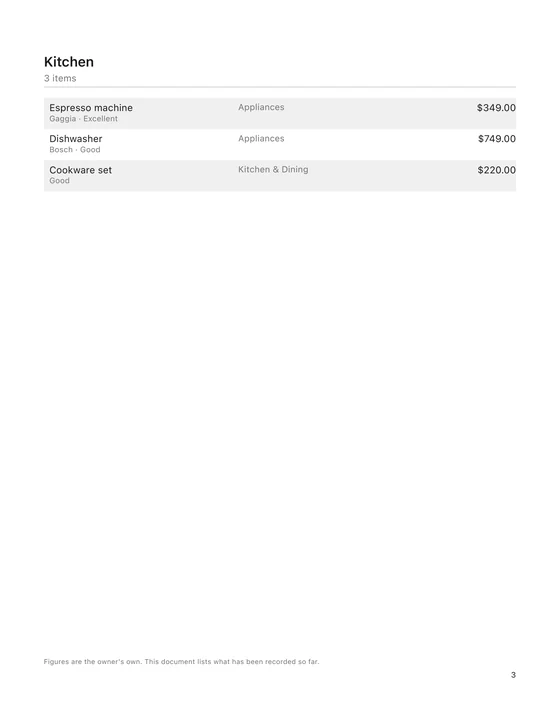
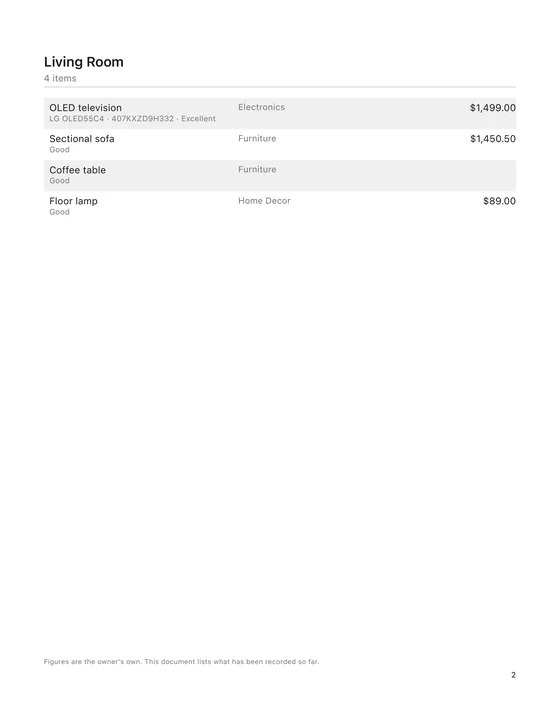
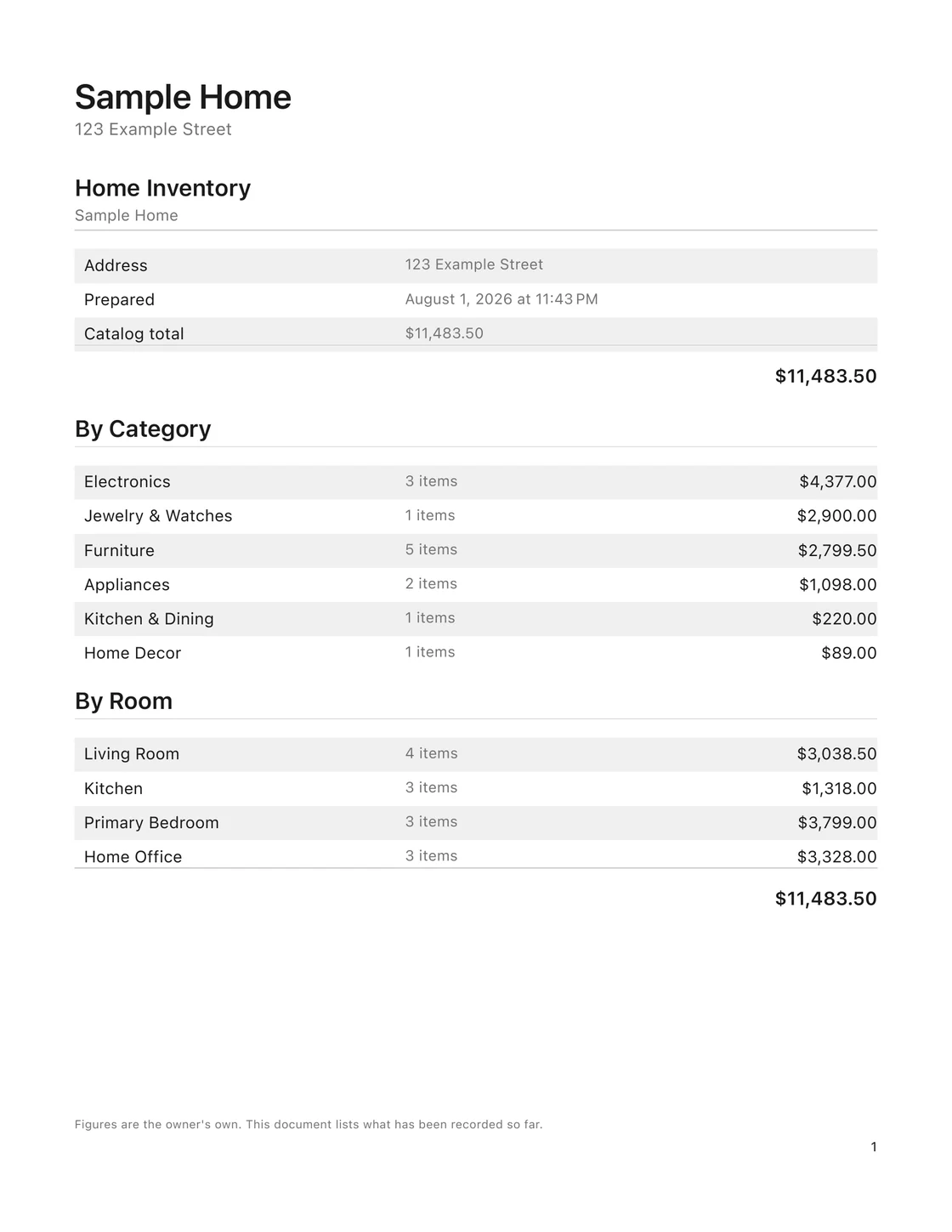
Not a mock-up. This is the file the app exports, on US Letter.
The report is the point
An inventory that only exists inside an app is of little use in a claim. What Roomkeep is built to produce is a document: printable, emailable, and legible to somebody who has never heard of Roomkeep.
- Every room, every thing
- Item tables by room, with category, condition and your own figure for each.
- Model and serial number
- Under the item name, where an adjuster looks for it.
- Totals that add up
- Subtotals by category and by room, and one catalog total on the first page.
- Receipts at the back
- Attached to the items they prove, not loose in a folder.
- Prepared date on the page
- So the document says when it was true.
- A4 and US Letter
- Readable in black and white, because that is how it gets printed.
What one line of it looks like
The detail that matters in a claim is the boring detail: which one it was, and how you know.
OLED television
Electronics
Serial numbers come off the nameplate with the camera. Receipts stay attached to the things they prove.
An evening, in three passes
Nobody documents a whole house in one go, and Roomkeep does not pretend otherwise.
Set out the rooms
Add a property and its rooms, then what is in them. Roomkeep is built for doing this in passes rather than in one sitting — the long tail of a home is not an afternoon of typing.
Do the valuables properly
The thirty or so things a claim really turns on get the full treatment: a photograph of the thing itself, the serial number off the nameplate with the camera, and the receipt attached to the item it proves. Photograph a receipt and Roomkeep suggests the store, the date and the total; you confirm each field before it is saved.
Print the report
One tap turns the catalog into the document at the top of this page. A short summary for your agent, or the full thing for a claim.
It keeps track of what is still missing
The readiness list counts how much of your catalog has photographs, figures and receipts, and keeps a shortlist of what is worth doing next — the expensive things first. Fifteen minutes against that list beats an afternoon of wondering where to start.
Put in your policy's contents figure and it sits beside your catalog total. Two numbers, side by side; the arithmetic is yours, and so is the decision.
Your figures, marked as yours
Roomkeep can suggest a typical range for a category, and says plainly that it is an estimate. It never tells you what your things are worth. The report prints your numbers and states on every page that they are the owner's own.
That matters more than it sounds: a document that overclaims on your behalf is worse than no document.
An inventory is a list of your valuables. It stays with you.
Serial numbers, photographs of what is worth stealing, and the address it is all kept at — in one file. That is not a thing to hand to a company because it might be useful to them later.
- No account and no sign-up. There is no server of ours anywhere.
- Reading receipts and serial numbers happens on the device. The photograph is not uploaded for it to work.
- iCloud sync, if you switch it on, goes to your own private iCloud database under your Apple Account. We get no copy.
- On the App Store this shows up as the Data Not Collected label, and it is declared in the app bundle itself.
This website holds to the same rule: no analytics, no cookies, no third-party fonts, no content delivery network. Read the privacy policy — it is written in English, not in generator template.
What it costs
One payment for everything, and it stays bought. No subscription.
Free
Nothing
Covers one property, one room and thirty items.
Photographing items, reading receipts and serial numbers and the readiness list all work in full. The report is a first-page preview.
Roomkeep Pro
$29.99
one payment, not a subscription.
Unlimited properties, rooms and items. Both report formats, spreadsheet and archive export, and iCloud sync across iPhone, iPad and Mac.
One purchase covers iPhone, iPad and Mac.
Before you install anything
- What do I actually end up with?
- A PDF you can print, email or hand over: totals by room and by category, item tables with photos, model and serial numbers, and receipts attached at the back. 5 pages for a small home, on A4 or US Letter, readable in black and white. There is a real one linked from this page — it is the file the app exports, not a mock-up.
- Is Roomkeep insurance advice?
- No, and it does not try to be. How much cover to buy, which policy to choose and what yours will pay are between you and your insurer. Roomkeep does the other job: writing down what you own, with the photographs, receipts and serial numbers that back it up, before you need them.
- Do I need an account?
- No. There is no sign-up, no password and no server of ours. You open the app and start adding rooms.
- Is Pro a subscription?
- No. Roomkeep Pro is one payment and it stays bought, and one purchase covers iPhone, iPad and Mac. There is no subscription to buy at all.
- What happens to my photographs?
- They stay on your device. If you turn on iCloud sync, they go to your own private iCloud database under your Apple Account, and nowhere else. There is no server of ours for them to reach.
- Can I get everything back out again?
- Yes, in one tap and in three shapes: the PDF report, a spreadsheet, or a complete archive with every photo that opens without Roomkeep. A record you cannot export is not much of a record.
Questions that come up after installing are on the support page.
Look at the document before you decide
It is the fastest way to tell whether this is the thing you want: the real export, five pages, straight from the app.
Roomkeep Pro: One purchase covers iPhone, iPad and Mac. Needs iOS 26, iPadOS 26 or macOS 26 or later.